Unreal Engine Integration
Assets
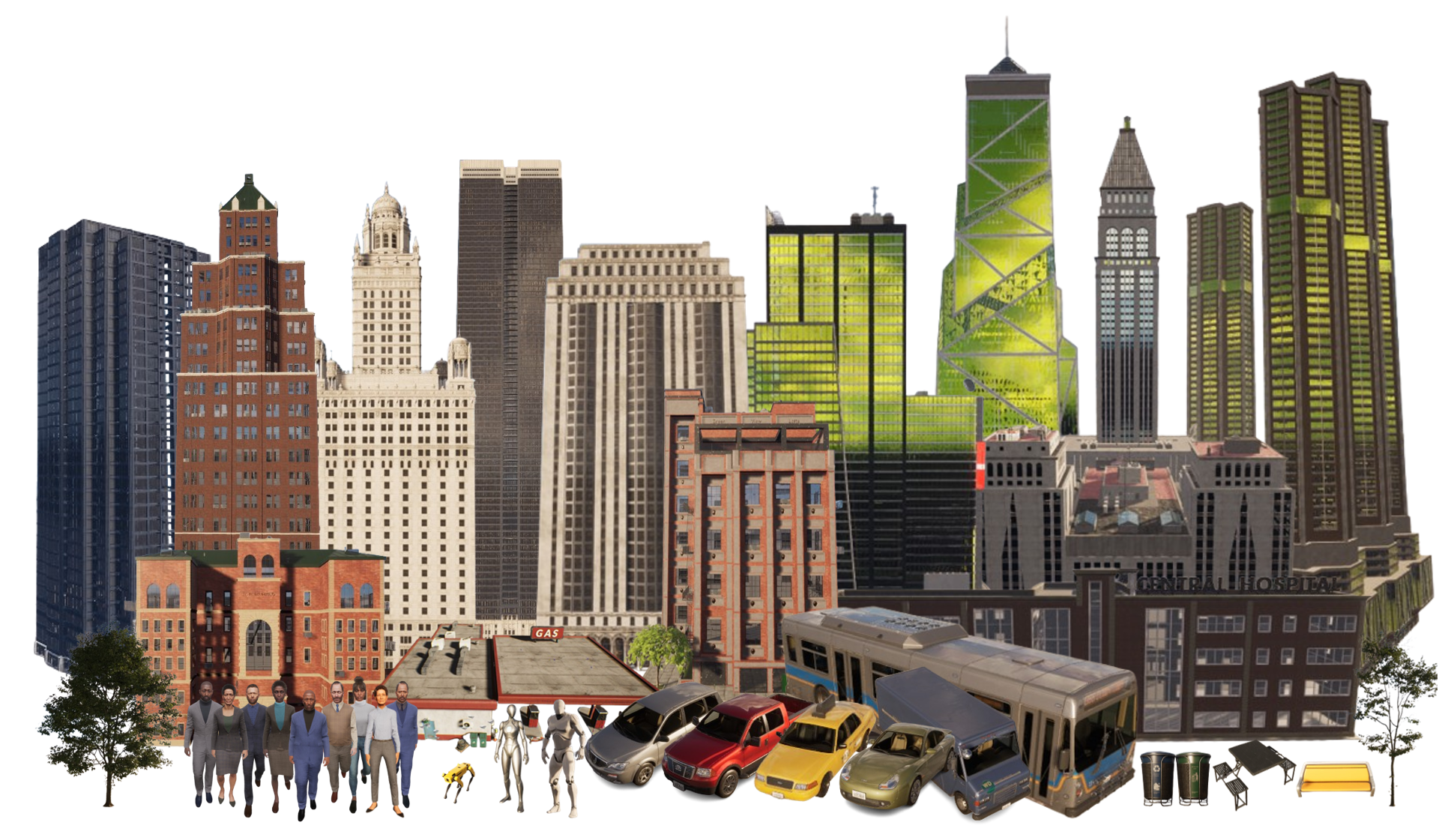
Our simulator provides a rich collection of city-scale assets, designed to support realistic and diverse urban simulations. These assets include buildings, trees, street furniture, vehicles, pedestrians, and robots. All assets are sourced from the Unreal Engine Marketplace to ensure high visual fidelity and performance.
In addition to the curated asset library, we also offer an Asset Generation Pipeline that enables users to create .uasset files directly from natural language descriptions. This tool streamlines the content creation process by converting user prompts into usable Unreal Engine assets, significantly lowering the barrier for customizing city environments.
Collected Assets
Below is a selection of the assets currently available in our simulator:
Buildings: A variety of architectural styles, including residential, commercial, and industrial structures.
Trees: Multiple tree species with seasonal variations to enhance environmental realism.
Street Furniture: Items such as benches, streetlights, boxes, and trash bins to add detail and immersion.
Vehicles: A range of vehicles including cars, buses, trucks, and scooters, each with accurate scale and animations.
Pedestrians: Human characters with diverse appearances and animations to simulate crowd behavior.
Robots: Different types of mobile robots for testing autonomous navigation and interaction, such as humanoid and robot dog.
These assets collectively enable the creation of complex, dynamic, and realistic city scenes for simulation, visualization, and research purposes.
Asset Generation Pipeline
Our Asset Generation Pipeline enables the automatic generation of 3D assets from natural language descriptions. This tool is currently designed for developers and is intended to be used within the Unreal Engine Editor. By translating descriptive text into .uasset files, this pipeline significantly accelerates asset creation, making it easier to populate large-scale environments with customized elements.
Warning
Asset Generation Pipeline can only be used in editor mode.
Actions
To enhance realism and interactivity in the simulation, we provide a comprehensive set of Action Space, with a strong focus on animations for pedestrians and robots. These actions are essential for simulating lifelike behaviors such as walking, running, waving, interacting with objects, and more. All actions are sourced from the Unreal Engine Marketplace to ensure quality and compatibility.
Here are some examples of actions available in the simulator:
Action |
Agent Type |
Category |
Description |
|---|---|---|---|
Move Forward |
Humanoid |
Navigation |
Keep moving in the current direction |
Directional Step |
Robot |
Navigation |
Step in a specified direction briefly |
Hold Position |
Robot |
Navigation |
Stay motionless for a short time |
Step Forward/Backward |
Humanoid |
Navigation |
Step forward/backward for a fixed time |
Rotate |
Humanoid, Robot |
Navigation |
Turn the body to face a new direction |
Stop |
Humanoid |
Navigation |
Stop moving |
Look Up/Down |
Humanoid, Robot |
Observation |
Adjust the gaze upward/downward by a degree |
Focus |
Humanoid, Robot |
Observation |
Adjust the field of view |
Pick Up |
Humanoid |
Object Interaction |
Grasp and lift an object |
Drop Off |
Humanoid |
Object Interaction |
Release a held object at the target location |
Set Throttle/Brack/Steering |
Vehicle |
Driving |
Control a vehicle |
Sit Down |
Humanoid |
Object Interaction |
Transition to a seated position |
Stand Up |
Humanoid |
Object Interaction |
Rise from a seated position |
Enter Car |
Humanoid |
Object Interaction |
Get into a vehicle |
Exit Car |
Humanoid |
Object Interaction |
Leave a vehicle |
Get On Scooter |
Humanoid |
Object Interaction |
Get on a scooter |
Get Off Scooter |
Humanoid |
Object Interaction |
Get off a scooter |
Have Conversation |
Humanoid |
Social Action |
Exchange verbal communication |
Point Direction |
Humanoid |
Social Action |
Gesture to indicate direction |
Wave Hand |
Humanoid |
Social Action |
Signal or greet with a hand wave |
Discuss |
Humanoid |
Social Action |
Engage in dialogue or explanation |
Argue with Body Language |
Humanoid |
Social Action |
Express disagreement using gestures |
Demo for human action space
# Initialize a humanoid agent with position (0, 0) and facing direction (1, 0)
humanoid = Humanoid(Vector(0, 0), Vector(1, 0))
humanoid_name = 'GEN_BP_Humanoid_0'

# Spawn the humanoid in the simulator using the specified model path
communicator.spawn_agent(humanoid, humanoid_model_path)

# Make the humanoid sit down
ucv.humanoid_sit_down(humanoid_name)

# Make the humanoid stand up
ucv.humanoid_stand_up(humanoid_name)

# Play an "argue" animation (the number may represent the type or intensity)
ucv.humanoid_argue(humanoid_name, 0)

# Play a "discuss" animation
ucv.humanoid_discuss(humanoid_name, 0)

# Play a "listening" animation
ucv.humanoid_listen(humanoid_name)

# Make the humanoid point or gesture along a path
ucv.humanoid_directing_path(humanoid_name)

# Play a waving gesture directed toward a dog
ucv.humanoid_wave_to_dog(humanoid_name)

# Make the humanoid pick up an object (e.g., a mug)
ucv.humanoid_pick_up_object(humanoid_name, "BP_Mug_C_1")

# Drop the currently held object
ucv.humanoid_drop_object(humanoid_name)

# Command the humanoid to enter a specific vehicle
ucv.humanoid_enter_vehicle(humanoid_name, "BP_VehicleBase_Destruction_C_1")

# Command the humanoid to exit that vehicle
ucv.humanoid_exit_vehicle(humanoid_name, "BP_VehicleBase_Destruction_C_1")

# Create a scooter object at position (100, 0) facing direction (0, 1)
scooter = Scooter(Vector(100, 0), Vector(0, 1))

# Spawn the scooter into the simulation
communicator.spawn_scooter(scooter, scooter_path)

# Make the humanoid get on the scooter
communicator.humanoid_get_on_scooter(agent.id)

# Set scooter attributes: speed = 0.5, direction = 0, angular velocity = 0
communicator.set_scooter_attributes(agent.scooter_id, 0.5, 0, 0)

# Make the humanoid get off the scooter
communicator.humanoid_get_off_scooter(agent.id, scooter.id)

# Make the humanoid step forward for 2 seconds
communicator.humanoid_step_forward(agent.id, 2)

# Rotate the humanoid 90 degrees to the left
communicator.humanoid_rotate(agent.id, 90, 'left')

# Start continuous forward movement
communicator.humanoid_move_forward(agent.id)

# Stop movement, optionally play a stop animation for 2 seconds
communicator.humanoid_stop(agent.id, 2)
Demo for robot action space
# Specify robot name and asset
robot_name = "Demo_Robot"
robot_asset = "/Game/Robot_Dog/Blueprint/BP_SpotRobot.BP_SpotRobot_C"

# Spawn robot in the simulator
ucv.spawn_bp_asset(robot_asset, robot_name)
ucv.enable_controller(robot_name, True)

# Robot - look up / look down
ucv.dog_look_up(robot_name)    # look up
ucv.dog_look_down(robot_name)  # look down

# Robot Movement
# direction: 0 = forward, 1 = backward, 2 = left, 3 = right
for direction in [0, 1, 2, 3]:
    speed = 200
    duration = 1
    move_parameter = [speed, duration, direction]
    ucv.dog_move(robot_name, move_parameter)
    time.sleep(duration)

# Robot Rotation
# clockwise: 1 = right turn, -1 = left turn
for angle, clockwise in [(90, 1), (-90, -1)]:
    duration = 0.7
    rotate_parameter = [duration, angle, clockwise]
    ucv.dog_rotate(robot_name, rotate_parameter)
    time.sleep(duration)
Related files: communicator.py, unrealcv.py.
A complete example can be found in scripts/ue_command_test.ipynb.
Sensors

As illustrated in the figure above, SimWorld supports a variety of sensors, including RGB images, segmentation maps, and depth images, enabling a rich understanding of the surrounding environment.
How to get images
# viewmode can be 'lit', 'depth' and 'object_mask'
image = communicator.get_camera_observation(camera_id, viewmode)

# adjust camera
ucv.get_cameras()
ucv.get_camera_location(camera_id)
ucv.get_camera_rotation(camera_id)
ucv.get_camera_fov(camera_id)
ucv.get_camera_resolution(camera_id)
ucv.set_camera_location(camera_id)
ucv.set_camera_rotation(camera_id)
ucv.set_camera_fov(camera_id)
ucv.set_camera_resolution(camera_id)
Related files: communicator.py, unrealcv.py.
Synchronous and Asynchronous mode
Our simulator supports both synchronous and asynchronous execution modes for communication between the Python client and the Unreal Engine (UE) server.
In synchronous mode, the Python client explicitly controls the simulation timing. At each step, it sends a tick command to the UE server and waits until the server completes the simulation update. This mode ensures deterministic behavior, which is especially important for reinforcement learning, multi-agent coordination, and evaluation tasks.
In asynchronous mode, the UE server runs continuously at its own frame rate, while the Python client retrieves data at any time. This allows for real-time interaction but can lead to non-determinism and race conditions in agent-environment interaction.
# Set simulation mode: choose between "sync" (synchronous) and "async" (asynchronous)
mode = "sync"
tick_interval = 0.05  # Duration of each simulation step in seconds (only used in sync mode)
ucv.set_mode(mode, tick_interval)

# Advance the simulation by one tick (tick_interval seconds)
ucv.tick()